
Skill-Lync Content Editor
A Notion-like rich text editor enabling content teams to create high-quality learning content with block-based editing, slash commands, and real-time collaboration.
Executive Summary
Skill-Lync, a premium engineering-focused EdTech platform, required a modern internal content authoring tool that could support their complex learning content needs. Traditional editors lacked the flexibility needed for structured lessons, embedded media, and interactive layouts.
CyberMind Works delivered a Notion-like rich text editor built on ProseMirror and Tiptap, featuring block-based editing with slash commands, custom content blocks for learning materials, and real-time collaboration powered by Yjs. The solution enabled content teams to work simultaneously on lessons without conflicts, dramatically improving content creation efficiency.
The editor supports custom schema rules for educational content, allowing content creators to insert structured blocks (videos, code snippets, quizzes) quickly, move them freely, and transform block types on the fly—all while maintaining data integrity and providing a seamless collaborative experience.
The Problem
Key technical and product challenges we needed to address for this content authoring system.
Traditional Editors Were Not Flexible Enough
Skill-Lync required an authoring tool that could support advanced learning content formats beyond plain text and formatting.
- •Structured blocks for complex content
- •Embedded videos and interactive media
- •Custom layouts for learning materials
- •Schema rules specific to educational content
Block-Based Editing + Custom Content Types
The editor needed to behave like Notion, where every element is a 'block' that can be managed independently.
- •Quick insertion via slash commands
- •Drag-and-drop block reordering
- •Block type transformations
- •Structured data representation
Real-Time Collaboration for Content Teams
Multiple admins and content creators needed to work on the same lesson simultaneously, without conflicts or data loss.
- •Conflict-free collaborative editing
- •Real-time cursor awareness
- •Seamless document syncing
- •Low-latency editing experience
Our Approach
CyberMind Works delivered a highly customizable Notion-like editor system using a modern editor stack based on ProseMirror.
- •ProseMirror Foundation: Deep control over editor schema, document structure validation, custom block rules, and predictable internal representation for complex learning content.
- •Tiptap Framework: Production-ready editor built on ProseMirror with rapid extension development, clean API for custom blocks, and modular architecture.
- •Yjs Collaboration: Real-time collaborative editing with CRDT-based conflict resolution, ensuring multiple users can edit simultaneously without data loss.
- •Custom Content Blocks: Specialized blocks for educational content including video embeds, code snippets, quizzes, and interactive elements with slash command insertion.
- •Block Management: Drag-and-drop reordering, block type transformations, and structured data representation for seamless content organization.
System Architecture
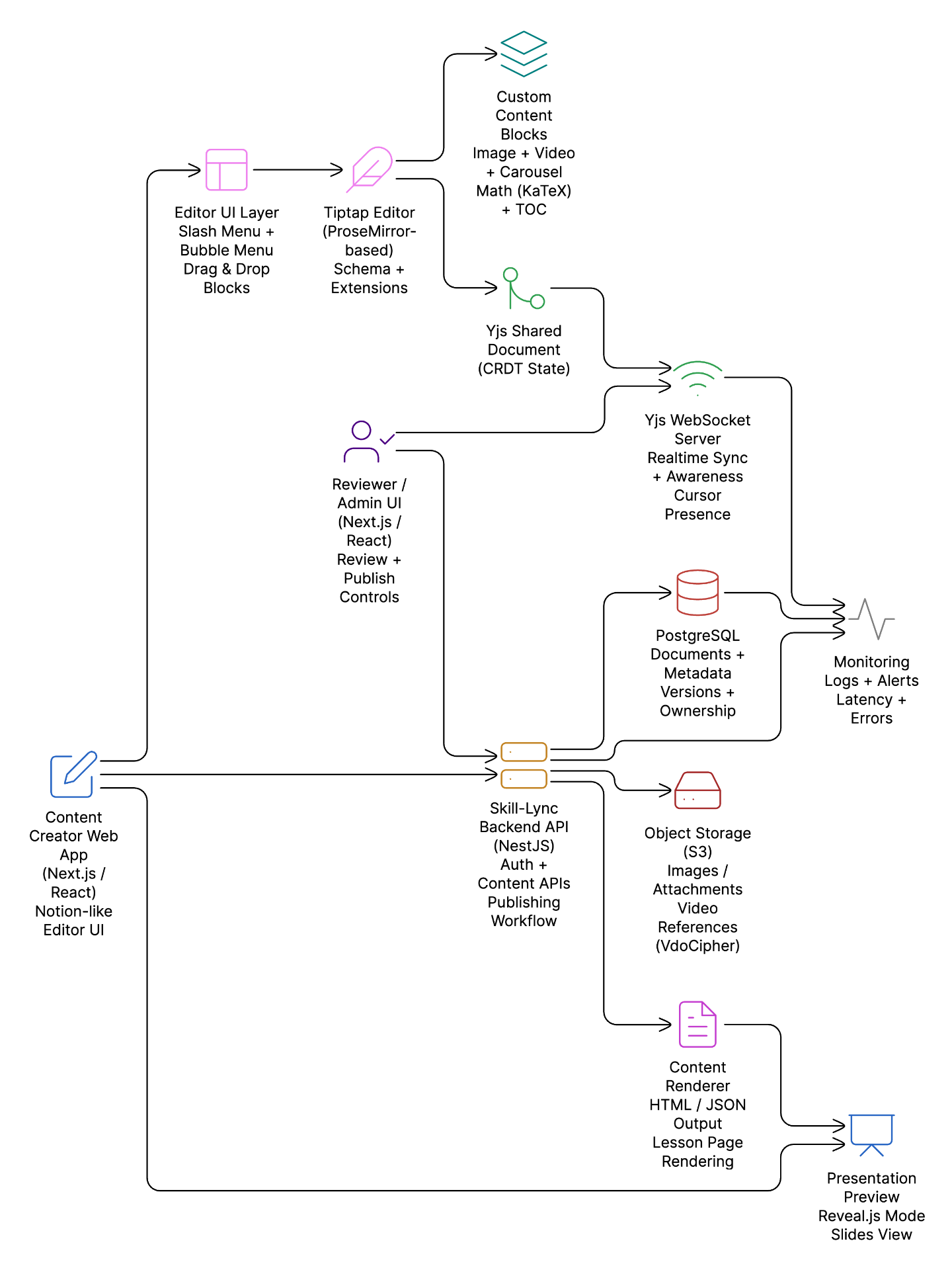
Features Delivered
A comprehensive set of editing capabilities built specifically for content authoring workflows.
Rich Text Editing Toolkit
Comprehensive editing capabilities using Tiptap extensions.
- Headings & lists
- Code blocks
- Text alignment
- Undo/redo history
Slash Menu (Notion-Style)
Quick / command menu to insert blocks instantly.
- Headings
- Images & videos
- Carousels
- Math blocks & callouts
Bubble Menu (Context Formatting)
Contextual floating menu appears when selecting text.
- Bold/italic/underline
- Code formatting
- Highlight
- Quick styling
Block Transformations
Notion-like 'Turn Into' experience for block conversion.
- Paragraph → Heading
- Text → Bullet list
- Blocks → Structured nodes
Drag & Drop Reordering
Content creators can reorder blocks via drag and drop.
- Internal reviews
- Mentor improvements
- Content refinements
Table of Contents
Auto-generated navigation for long-form content.
- Auto-generates from headings
- Quick navigation
- Improves structure
Custom Nodes Built for Skill-Lync
Skill-Lync content is not typical blog content—it needs rich learning media. We built custom structured blocks specifically for educational content.
Resizable Image Node
Images with resizable behavior and stable layout controls for controlled rendering inside lessons.
Video Embed Node
Supports YouTube and VdoCipher (commonly used in EdTech for protected video streaming).
Carousel Node
Multiple assets inside a single block with smooth UI using Embla Carousel for step-by-step explanations.
Math Node
Formula rendering using KaTeX, ideal for engineering and math-heavy lessons.
Real-Time Collaboration
To support multi-user authoring, we implemented live collaboration using CRDT-based technology for conflict-free editing.
Yjs
CRDT-based collaborative editing framework
WebSocket
Real-time sync transport layer
Cursor Tracking
Live cursor awareness for all users
Presentation Preview Mode
Skill-Lync teams also needed a way to preview content in an interactive format for internal demos, presentations, and structured teaching flows.
Reveal.js Integration
Presentation-like preview for content demonstrations
Technology Stack
A modern, production-ready stack optimized for rich content editing and collaboration.
ProseMirror + Tiptap
Yjs + WebSocket
Tippy.js for floating menus
KaTeX
Embla Carousel
Reveal.js
Outcomes
This editor system transformed how Skill-Lync creates and manages educational content.
- •Create and manage learning content faster
- •Maintain consistent formatting and structured content blocks
- •Enable collaborative lesson building across teams
- •Improve the authoring experience with Notion-like workflows
- •Support richer learning assets such as videos, math, and carousels
Conclusion
CyberMind Works successfully delivered a modern, scalable, Notion-like editor system for Skill-Lync that combines rich content authoring, real-time collaboration, and extensibility.
This solution demonstrates our expertise in building complex web-based productivity tools with highly customizable editors and structured content systems—tailored specifically for EdTech platforms.
About Us
Portfolio
Careers
CyberMind Works LLP
10/15, K.M Towers - 1st Floor, Chakrapani Road,
Guindy, Chennai, Tamil Nadu, 600042
Copyright © 2026, CyberMind Works | All rights reserved.