
Tail Lens
Tailwind CSS Visual Editor Browser Extension for Chrome + Firefox
Visit taillens.io →Executive Summary
Tail Lens is a browser-based Tailwind CSS visual editor built as a Chrome and Firefox extension. It enables developers to inspect, edit, and refine Tailwind utility classes directly on the live page, then copy the final class list back into their codebase.
It was created to solve a common workflow issue in Tailwind-heavy projects: UI iteration becomes slow and repetitive when developers must constantly switch between DevTools, the code editor, and page reloads. Tail Lens replaces that loop with a live editing workflow where changes are visible instantly.
Since launch, Tail Lens has grown to 1,000+ total users and 100+ paid users, and is actively used in production workflows by developers and teams building with Tailwind CSS.
The UI Iteration Problem
Tailwind CSS is powerful, but day-to-day UI refinement is still inefficient.
When developers want to tweak spacing, layout, typography, or colors, they often end up in a repetitive loop:
This process is not only time-consuming, it also interrupts focus. Tailwind's utility-first approach is meant to speed up development, but during fine-tuning and debugging it can become a trial-and-error workflow.
Most browser tools are good at showing computed styles, but they do not provide a Tailwind-native editing workflow where users can experiment visually, compare options, and reliably export the final utility set.
Browser as an Editing Environment
Tail Lens turns the browser from a passive inspection surface into an interactive Tailwind editing environment.
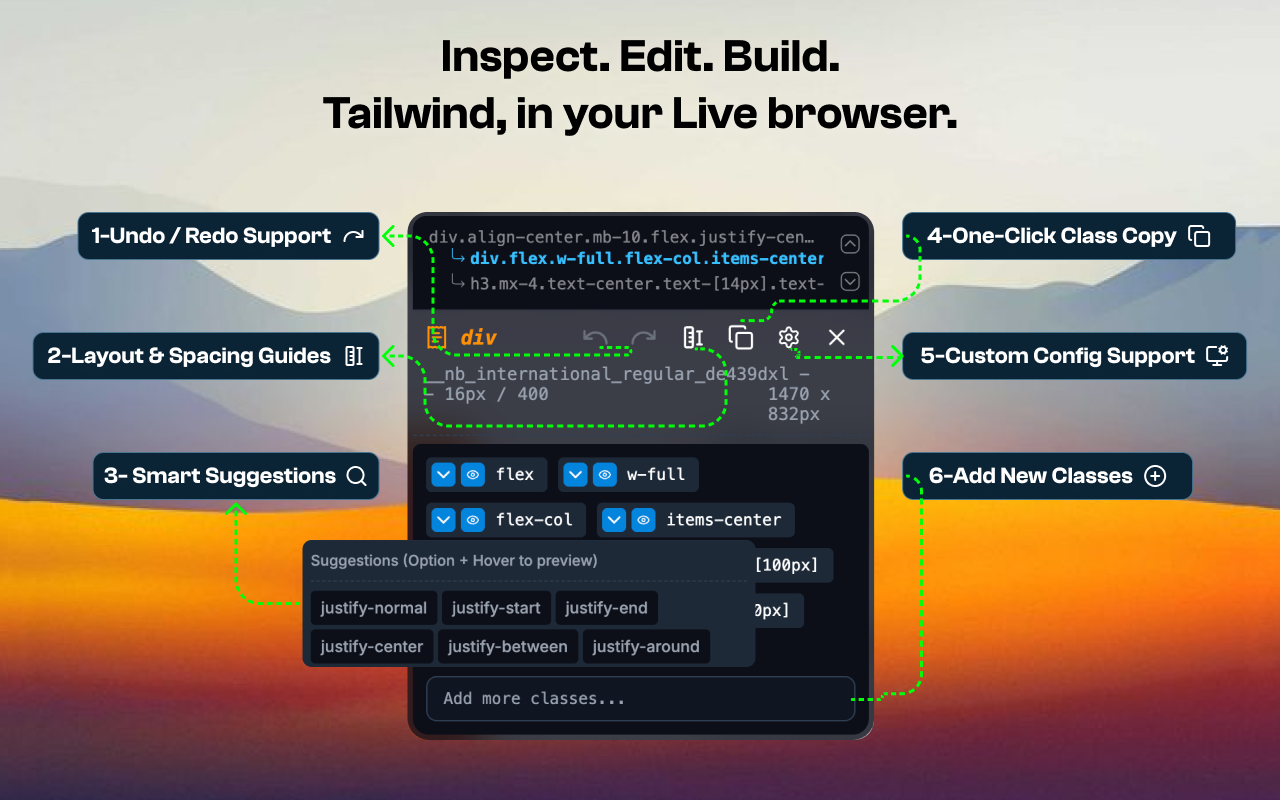
Instead of treating Tailwind utilities as opaque strings, Tail Lens makes them editable and understandable while the UI is still live. Developers can select an element, see the exact Tailwind classes applied, make edits instantly, preview alternatives, and then copy a clean class list back into code.
This shift is what makes Tail Lens valuable in real workflows: developers can explore UI changes quickly without committing edits prematurely, and only push final decisions back into the codebase.
What Tail Lens Enables
Real-time inspection
Hover and select elements to view Tailwind utilities immediately.
Live editing
Add, remove, or modify classes with instant visual feedback on the page.
Tailwind-aware suggestions
Autocomplete and alternatives reduce guesswork and speed up discovery.
CSS preview
"Alt + Hover" shows the generated CSS behind any utility for debugging and clarity.
Custom configuration support
Works with project-specific Tailwind configs, across Tailwind v3 and v4.
Visual rulers
Spacing and measurement overlays help validate layout decisions precisely.
How It's Built
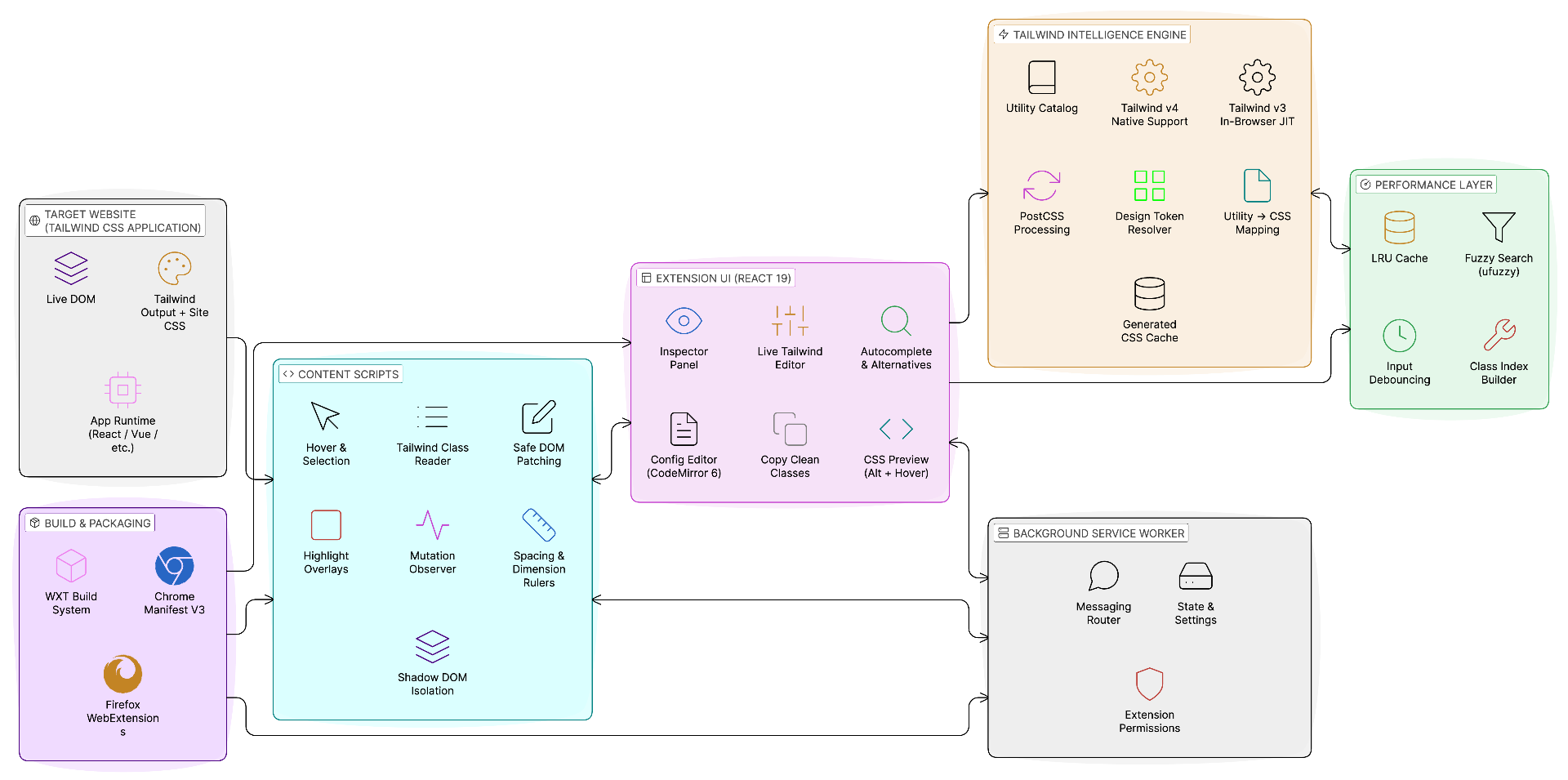
Tail Lens is built as a cross-browser extension with a clear separation between the page it runs on and the extension UI it renders.
Core Design Principles
Major Components
Content Scripts (Page Interaction Layer)
Content scripts are injected into the active page. They are responsible for interacting with the live DOM safely:
- Detect hover/selection and identify the active element
- Read and interpret class lists from the DOM
- Apply live class changes to the element for instant preview
- Render overlays such as selection outlines and visual rulers
- Host isolated UI surfaces using Shadow DOM
Extension UI (Editor & Inspector Layer)
The extension UI is built using React 19, with Radix UI + shadcn/ui components. It presents the experience developers actually use:
- Class inspector and utilities panel
- Inline editor for adding/removing/modifying utilities
- Suggestions and alternatives exploration
- CSS preview output and copy-ready class export
- Configuration editing (with a dedicated editor experience)
Tailwind Intelligence & CSS Engine
This is the "Tailwind-aware" layer that powers class understanding and CSS preview:
- Tailwind v3 support: in-browser JIT compilation using @mhsdesign/jit-browser-tailwindcss
- Tailwind v4 support: using Tailwind 4.x native compilation and design-system loading model
- Utility-to-CSS mapping for generated output
- Post-processing via PostCSS where needed
- Cached generated outputs to keep previews fast
Background Service Worker (Coordination Layer)
The background layer coordinates messaging and extension state:
- Routes messages between content scripts and the UI
- Stores user-level settings and configuration state
- Ensures consistent behavior across tabs and domains
Performance Layer (Search + Caching)
To keep the product responsive even with large Tailwind utility sets:
- Fuzzy search via @leeoniya/ufuzzy for autocomplete and discovery
- Multi-layer caching via QuickLRU for configs, elements, and alternatives
- Debounced search and precomputed indexes to keep suggestions instant
Tools & Technologies
Tail Lens uses a modern extension stack optimized for UI responsiveness and browser compatibility.
Core Stack
React 19.1.0FrameworkTailwind CSS 4.1.4Styling (extension UI)React Context APIStateRadix UI + shadcn/uiComponentsWXT 0.20.13Extension BuildKey Dependencies
@mhsdesign/jit-browser-tailwindcssTailwind v3 JIT in browser
tailwindcss 4.xTailwind v4 native support
CodeMirror 6Configuration editing experience
@leeoniya/ufuzzyFast fuzzy searching for suggestions
PostCSSCSS transformation/prefixing
QuickLRUHigh-performance LRU caching
Browser APIs
Engineering Challenges
This section outlines the practical engineering challenges faced while building Tail Lens for production use.
Tailwind Compilation in a Browser Environment
Problem:
Tailwind compilation is traditionally done in a Node.js toolchain. Browser extensions do not have the same runtime, and compilation needs to happen fast enough to support interactive usage.
Solution:
Tail Lens implements version-aware engines to support both ecosystems:
- For Tailwind v3, it uses an in-browser JIT pipeline (@mhsdesign/jit-browser-tailwindcss) to generate scoped CSS on-demand.
- For Tailwind v4, it uses Tailwind 4.x's native compilation and design-system approach to produce CSS output in a way that works inside extension constraints.
- This dual support makes Tail Lens usable across a wide range of projects, including older production codebases and newer Tailwind v4 setups.
Preventing Style Conflicts with Arbitrary Websites
Problem:
Tail Lens must work on any website. Websites can have aggressive global CSS, resets, or conflicting styles that could break the extension UI. At the same time, the extension must not leak its styling into the host page.
Solution:
Tail Lens uses Shadow DOM isolation for UI surfaces and overlays, ensuring that:
- Host page styles do not override the extension UI
- Extension styles do not affect the host application
- The editing experience remains visually consistent across sites
This was critical for making Tail Lens dependable on real production websites with complex styling.
Real-Time Editing Without Breaking the Page
Problem:
Live editing requires modifying DOM class lists, which—if done incorrectly—can break layouts, interfere with application state, or introduce hard-to-debug issues, especially on complex production pages.
Solution:
Tail Lens uses a safe, controlled editing model via content scripts:
- Only class-level changes are applied
- All edits are session-based and reversible
- Changes are scoped to the selected element only
- Visual overlays clearly indicate what is being modified
This allows developers to experiment confidently, knowing they are previewing changes without risking page stability.
Fast Suggestions Across Very Large Utility Sets
Problem:
Tailwind v4 exposes very large sets of utilities. Searching and suggesting classes must remain instant, otherwise the editor feels sluggish and unusable.
Solution:
Tail Lens combines:
- Precomputed searchable class indexes
- uFuzzy for fast fuzzy matching
- Debounced input to avoid wasted work while typing
- Multi-layer caches for repeated searches and computed suggestion sets
This is why Tail Lens can provide suggestions and alternatives smoothly even on large configs and long sessions.
Generating Accurate Alternatives (Not Just Similar Names)
Problem:
Developers don't just want autocomplete—they want meaningful alternatives. For example, when adjusting a background color or spacing value, they want a set of options that truly belongs to the same CSS property group.
Solution:
Tail Lens builds an alternative selection system that groups utilities based on how they resolve:
- Alternatives are derived from the underlying Tailwind system behavior
- For color utilities, options can be displayed with previews to reduce guesswork
- Users can hover to preview changes live and apply the chosen alternative instantly
This feature reduces trial-and-error and improves iteration speed, especially for visual refinements.
Maintaining Cross-Browser Parity (Chrome + Firefox)
Problem:
Extension APIs differ subtly between Chrome and Firefox, and platform differences can introduce drift over time.
Solution:
Tail Lens maintains a unified build and packaging workflow with WXT, keeping a single codebase while producing browser-specific artifacts for:
- Chrome (Manifest V3)
- Firefox (WebExtensions)
This ensures consistent UX and reduces long-term maintenance complexity.
Conclusion
Tail Lens proves that a developer tool can be both technically deep and practically useful when it focuses on a real workflow bottleneck.
By combining a non-intrusive extension architecture, strong isolation using Shadow DOM, Tailwind-aware engines supporting v3 and v4, high-performance search and caching, and a live editing workflow that keeps developers in flow, Tail Lens has become a reliable tool for real-world Tailwind development.
The extension is trusted by over 1,000 developers and actively used in production workflows, demonstrating our expertise in building developer tools that solve genuine productivity challenges while maintaining technical excellence.
About Us
Portfolio
Careers
CyberMind Works LLP
10/15, K.M Towers - 1st Floor, Chakrapani Road,
Guindy, Chennai, Tamil Nadu, 600042
Copyright © 2026, CyberMind Works | All rights reserved.